Return shipping options to the checkout
Implement POST /shippingoptions for the Kustom Shipping Assistant: required fields, and how to build home delivery, pickup point, time slot and add-on options.
The delivery choices a customer sees in the checkout are the ones your TMS sends back here, which
makes this the heart of the integration. Kustom sends you the cart and the customer’s address
with POST /shippingoptions, and shows the options you return. This page covers when Kustom
asks, what it sends, the three fields every option needs, and each way of building an option,
from a plain home delivery to pickup points, time slots, add-ons and badges. It’s required: a
missing or failed answer puts the checkout on the merchant’s own fallback options.
When Kustom calls it
Section titled “When Kustom calls it”- The address or cart changes. That includes the moment the checkout opens, when the address may be only a country.
- The customer searches for pickup points near another postal code (see Pickup-point searches).
- You refused a reservation on
POST /shipment, so the customer can pick again.
Kustom reuses your answer for 5 minutes when nothing in the request has changed, so you
won’t see a call for every keystroke. It ignores any Cache-Control you send.
It doesn’t call you for a cart with nothing physical in it, and it stops calling you for the rest of a checkout once that checkout has fallen back.
Request
Section titled “Request”POST /shippingoptionsContent-Type: application/vdn.klarna.shipping.get_options-v1+jsonAuthorization: Bearer <token>{ "session_id": "f7b7dda8-c9a6-405d-8cca-1c3cbdfda1c0", "locale": "sv-SE", "currency": "SEK", "geoblocking": false, "recipient": { "given_name": "Klara", "family_name": "Joyce", "street_address": "Sveavägen 42", "postal_code": "111 34", "city": "Stockholm", "country": "SE", "phone": "+46708800000", "email": "customer@example.com", "customer_type": "person" }, "order": { "id": "17d4cd21-99cd-4ffa-97d6-257b258cf053", "total_amount": 79900, "total_tax": 15980, "total_weight": 890, "tags": ["member"], "merchant_reference1": "45099", "lines": [ { "type": "physical", "reference": "sku-1234", "quantity": 1, "unit_price": 79900, "tax_rate": 2500, "total_tax_amount": 15980, "total_price_including_tax": 79900, "total_discount_amount": 0, "attributes": { "weight": 890, "dimensions": { "height": 60, "width": 300, "length": 400 }, "tags": ["fragile"] } } ] }}| Field | Meaning |
|---|---|
session_id | The checkout. The same value arrives on every call for it, POST /shipment included |
locale, currency | The customer’s language and the order currency. Return names and prices to match |
geoblocking | true when the customer’s billing country is one the merchant doesn’t ship to, so recipient holds only a country |
recipient | Where the parcel goes, as far as the customer has filled it in. Name, phone and email fall back to the billing details. customer_type is person or organization |
order.lines | The physical items only, without any shipping fee line. attributes carries the merchant’s weight (grams), dimensions (millimeters) and tags, when they sent them |
order.total_weight | Weight × quantity summed over the physical lines, in grams |
order.total_amount, order.total_tax | Minor units, without shipping |
order.tags | The merchant’s tags for the whole cart |
order.merchant_reference1, merchant_reference2 | The merchant’s own order references, when they set them |
selected_shipping_option_id | Only on a pickup-point search |
Anything the merchant didn’t send is left out, not sent as null. Never assume a field
beyond session_id, locale, currency and recipient.country is present. Fields may also be
added to the request in the future, so ignore any field you don’t recognize rather than
rejecting the call.
Response
Section titled “Response”Answer 200 — not 201 — with the options in a shipping_options list. Any other status, a
timeout or a body Kustom can’t read puts the checkout on the merchant’s fallback options for
the rest of that session.
{ "shipping_options": [ { "id": "pn-home", "type": "delivery-address", "carrier": "postnord", "price": 4900, "tax_rate": 2500 } ]}That’s a complete, valid answer. Every option needs three fields, and everything else is optional:
| Field | Meaning |
|---|---|
id | Your id for the option. Non-empty. Sent back on POST /shipment and stored on the merchant’s order |
price | Minor units, tax included. 0 for free. Never negative |
tax_rate | Two implicit decimals: 2500 is 25%. Never negative |
The checkout shows options in the order you return them, so sort them the way you want the customer to read them. An empty list is a valid answer, not a failure: the customer sees “We cannot ship to the given address” and can’t buy until the address changes.
One bad value rejects every option. Kustom validates the whole response before showing any of it. A single unknown type,
carrier, class, add-on type or feature type, a malformed date, time or URL, or an option
missing id, price or tax_rate, and the entire answer is discarded. The checkout falls
back for the rest of that session. Send every value in lowercase, exactly as listed on this page.
Examples
Section titled “Examples”Three options a customer in Stockholm might be offered for one order, each showing one part of an
option: its type, its add-ons and its features. Each is complete as it stands, beside what the
checkout draws for it. Return them together in one shipping_options list. The times are in UTC,
so the checkout shows them two hours later, in Swedish summer time.
Type: a pickup point
Section titled “Type: a pickup point”type decides what the customer has to choose. A pickup type needs locations: the checkout
preselects the first, and the customer can pick another from a list and a map.
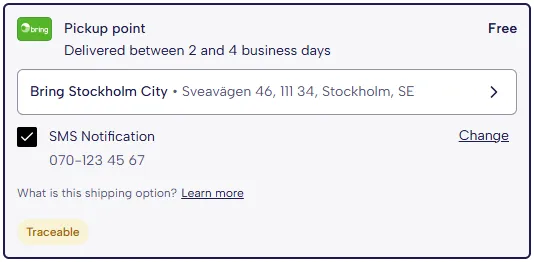
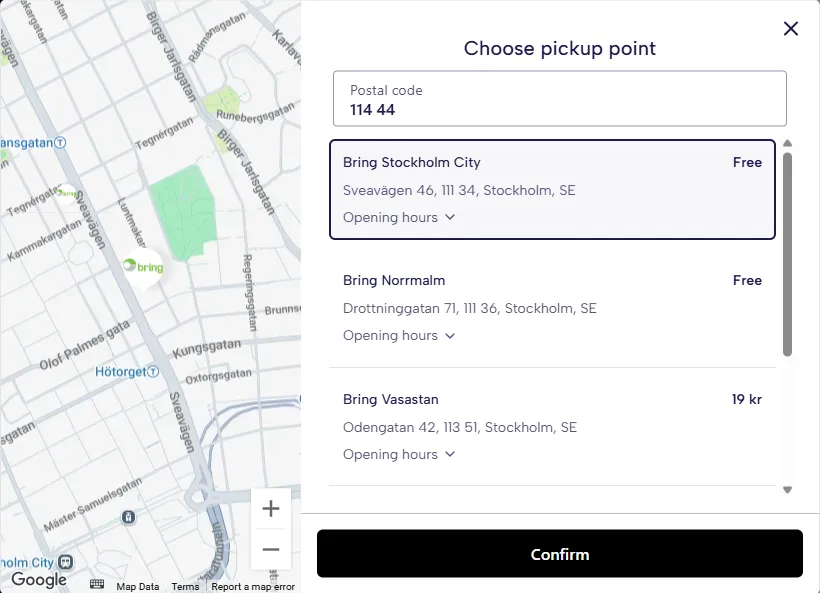
{ "id": "pickup-bring", "type": "pickup-point", "carrier": "bring", "name": "Pickup point", "price": 2900, "tax_rate": 2500, "delivery_time": { "interval": { "earliest": 2, "latest": 4 } }, "locations": [ { "id": "loc-sto", "name": "Bring Stockholm City", "price": 0, "address": { "street_address": "Sveavägen 46", "postal_code": "111 34", "city": "Stockholm", "country": "SE" }, "coordinates": { "lat": 59.336946, "lng": 18.063095 }, "operational_hours": { "default": [{ "open": "09:00", "close": "20:00" }], "overrides": { "weekday": { "sat": [{ "open": "10:00", "close": "16:00" }], "sun": [{ "closed": true }] }, "date": [ { "date": "2026-10-16", "hours": { "open": "10:00", "close": "14:00" } } ] } } }, { "id": "loc-norrmalm", "name": "Bring Norrmalm", "price": 0, "address": { "street_address": "Drottninggatan 71", "postal_code": "111 36", "city": "Stockholm", "country": "SE" }, "coordinates": { "lat": 59.33889, "lng": 18.05963 }, "operational_hours": { "default": [{ "open": "08:00", "close": "21:00" }] } }, { "id": "loc-vasastan", "name": "Bring Vasastan", "price": 1900, "address": { "street_address": "Odengatan 42", "postal_code": "113 51", "city": "Stockholm", "country": "SE" }, "coordinates": { "lat": 59.34327, "lng": 18.05398 }, "operational_hours": { "default": [{ "open": "09:00", "close": "19:00" }] } } ], "features": [ { "type": "traceable" }, { "type": "learn-more", "url": "https://example.com/bring-pickup" } ], "addons": [ { "type": "sms", "id": "sms", "preselected": true } ]}pickup-pointrequireslocations: the customer has to choose one. Without them the checkout shows “No service point found” and the customer can’t buy with the option. If the carrier arranges the pickup point after the purchase, usegeneric-pickupinstead. It needs no locations, and the checkout tells the customer “Your courier will get in touch with more details about your delivery.” Every type is in Option types.- A location’s
pricereplaces the option’s price, and0counts. The option costs 29 kr, but the row says Free because the preselected location is free, and Vasastan costs 19 kr. Leavepriceout of a location that should cost what the option does. - Opening hours: the usual week, shorter on Saturdays, closed on Sundays, and a one-off change for 16 October. The rules are in Locations.
Add-ons: a home delivery
Section titled “Add-ons: a home delivery”Add-ons are what the customer adds to an option: something to type for the courier, or a service to switch on. They show once the customer selects the option.
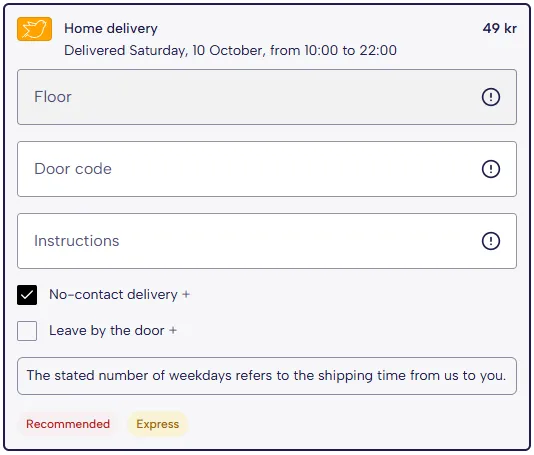
{ "id": "home-early-bird", "type": "delivery-address", "carrier": "early-bird", "class": "express", "name": "Home delivery", "price": 4900, "tax_rate": 2500, "delivery_time": { "earliest": "2026-10-10T08:00:00Z", "latest": "2026-10-10T20:00:00Z", "time_of_day": { "earliest": "2026-10-10T08:00:00Z", "latest": "2026-10-10T20:00:00Z" }, "cutoff": "2026-10-09T13:00:00Z" }, "features": [ { "type": "recommended" }, { "type": "express" }, { "type": "delivery-time-extra-info" } ], "addons": [ { "type": "floor-number", "id": "floor", "max_length": 3 }, { "type": "entry-code", "id": "entry-code", "max_length": 10 }, { "type": "additional-instructions", "id": "instructions", "max_length": 100 }, { "type": "contactless-delivery", "id": "contactless", "preselected": true }, { "type": "leave-outside-door", "id": "leave-outside" } ]}- Three text add-ons, each capped with
max_length: what the customer types comes back to you onPOST /shipment. - Two switches, with No-contact delivery ticked from the start by
preselected. No-contact and Leave by the door only appear when the customer’s billing country is Sweden, Norway, Finland, Denmark or Germany. - All five are free. A
priceon an add-on is added to the option’s price when the customer takes it. Every add-on is in Add-ons.
Features: a mailbox delivery
Section titled “Features: a mailbox delivery”Features decorate an option without asking the customer anything: badges, info boxes and links. Badges show on the option’s row whether or not it’s selected.

{ "id": "postal-postnord", "type": "postal", "carrier": "postnord", "name": "Mailbox delivery", "price": 3900, "tax_rate": 2500, "delivery_time": { "interval": { "earliest": 1, "latest": 3 } }, "features": [ { "type": "eco-friendly" }, { "type": "carbon-compensated" }, { "type": "traceable" } ]}- Each feature is just a
type. The checkout supplies the wording and the color, in the customer’s language. - An info box is a feature too: the home delivery above carries
delivery-time-extra-info, and a Learn more link is the pickup point’slearn-more. Every feature is in Badges and info boxes. - Some badges carry a logo.
svanendraws the Nordic Swan Ecolabel:

Option fields
Section titled “Option fields”| Field | Default | Meaning |
|---|---|---|
id, price, tax_rate | — | Required. See Response |
type | generic-shipping | The kind of delivery — see Option types |
carrier | generic | Drives the logo — see Carrier values |
class | standard | standard, economy, express or courier |
name | — | The title the customer sees — see Names |
free_above | — | Order amount, in minor units, from which you ship this option free. Shows a message and a progress bar, but doesn’t change price |
preview | false | See Preview options |
delivery_time | — | See Delivery time |
locations | — | Required in practice for pickup types — see Locations |
timeslots | — | See Time slots |
addons | — | See Add-ons |
features | — | See Badges and info boxes |
Option types
Section titled “Option types”type decides what the customer has to choose, and how the checkout titles the option. They
fall into three groups:
| Kind | type | The option needs |
|---|---|---|
| Home delivery | delivery-address | Nothing more. Add timeslots to have the customer pick one |
| Pickup | pickup-point, pickup-box, pickup-merchant-store, click-collect, pickup-warehouse | locations, required. Without them the customer can’t buy with the option |
| Everything else | postal, generic-shipping, generic-pickup, office-delivery, b2b-delivery-address, boat-delivery, crane-delivery, pallet-delivery | Nothing more |
Use generic-shipping or generic-pickup when the carrier arranges the details with the
customer after the purchase; the checkout says the courier will be in touch. Don’t return
digital: Kustom adds that itself for digital goods. What each type means is in the
POST /shippingoptions reference.
name is the title the customer sees, next to the carrier’s logo, and it’s stored on the
merchant’s order too. Kustom doesn’t translate it, so send it in the language of the request’s
locale: “Hemleverans” for sv-SE, “Home delivery” for en-SE.
Delivery time
Section titled “Delivery time”delivery_time is optional, but it’s the line the customer reads most. It takes one of two forms,
and you can add a time-of-day window or an order-by time to either.
| You send | The customer sees |
|---|---|
interval with earliest and latest in whole days | “1–3 business days” |
earliest and latest as ISO 8601 date-times | The dates, such as “Tomorrow” |
either, plus time_of_day with earliest and latest | The day, and a window such as 08:00–20:00. Only the time part is read |
either, plus cutoff | An order-by time |
- If both are present for the same end,
intervalwins over the date.interval.utc_offset_in_secondssets the time zone the days are counted in. - You can send only
earliestor onlylatest. delivery_timeis ignored, not rejected, when it holds neither anintervalnor a date, such as only acutoff, or whenlatestcomes beforeearliest. The option is still shown, with no delivery time.- A date that isn’t valid ISO 8601 rejects the whole response.
Locations
Section titled “Locations”| Field | Required | Meaning |
|---|---|---|
id | Yes, in practice | Sent back on POST /shipment and stored on the merchant’s order |
name | Yes, in practice | Shown in the list |
address | Yes, in practice | street_address, street_address2, postal_code, city, region, country |
coordinates | Recommended | lat and lng, which place the location on the map |
price | No | Replaces the option’s price when this location is chosen. 0 makes it free |
operational_hours | No | See below. A malformed time rejects the whole response |
delivery_time | No | Overrides the option’s delivery_time for this location |
operational_hours.default is the usual week. overrides.weekday replaces it for named days
(mon to sun), and overrides.date for specific dates, each
{ "date": "2026-12-24", "hours": { ... } }. Each entry is one of:
{ "open": "09:00", "close": "20:00" }, and a day can hold several ranges.{ "always_open": true }, on its own.{ "closed": true }, on its own.
Times win: an entry with open and close is read as those times even if it also says
always_open or closed.
Time slots
Section titled “Time slots”| Field | Required | Meaning |
|---|---|---|
id | Recommended | Sent back on POST /shipment as the chosen slot |
start, end | Yes | ISO 8601 date-times. A malformed one rejects the whole response |
price | No | Replaces the option’s price when this slot is chosen |
cutoff | No | ISO 8601. The latest moment this slot can be booked |
Slots can go on any option type. On delivery-address the customer must pick one; on other
types picking one is optional. With no delivery_time, the option’s row shows the first slot:
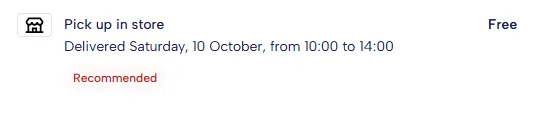
{ "id": "clickcollect-flagship", "type": "click-collect", "carrier": "merchant", "name": "Pick up in store", "price": 0, "tax_rate": 2500, "locations": [ { "id": "store-flagship", "name": "Flagship Store Stockholm", "address": { "street_address": "Drottninggatan 53", "postal_code": "111 21", "city": "Stockholm", "country": "SE" }, "coordinates": { "lat": 59.3326, "lng": 18.0636 }, "operational_hours": { "default": [{ "open": "10:00", "close": "19:00" }], "overrides": { "weekday": { "sun": [{ "open": "12:00", "close": "16:00" }] } } } } ], "timeslots": [ { "id": "slot-morning", "start": "2026-10-10T08:00:00Z", "end": "2026-10-10T12:00:00Z", "cutoff": "2026-10-09T13:00:00Z" }, { "id": "slot-afternoon", "start": "2026-10-10T12:00:00Z", "end": "2026-10-10T16:00:00Z", "cutoff": "2026-10-09T13:00:00Z" } ], "features": [ { "type": "recommended" }, { "type": "merchant-info-text", "merchant_info_text": "Pick up in store and skip the shipping fee." } ]}A slot’s price replaces the option’s, like a location’s. Here the customer must pick a slot,
Tuesday costs the option’s 59 kr, Wednesday 49 kr, and Tuesday can only be booked until 10:00
Stockholm time:
{ "id": "home-evening", "type": "delivery-address", "carrier": "budbee", "name": "Evening delivery", "price": 5900, "tax_rate": 2500, "timeslots": [ { "id": "ts-tue", "start": "2026-10-13T15:00:00Z", "end": "2026-10-13T19:00:00Z", "cutoff": "2026-10-13T08:00:00Z" }, { "id": "ts-wed", "start": "2026-10-14T15:00:00Z", "end": "2026-10-14T19:00:00Z", "price": 4900 } ], "features": [{ "type": "evening" }], "addons": [{ "type": "sms", "id": "sms", "required": true }]}Add-ons
Section titled “Add-ons”Add-ons are extras the customer chooses on top of an option. You decide which ones each option
offers, and what each costs. The customer’s answers come back to you on POST /shipment.
| Field | Default | Meaning |
|---|---|---|
type | — | Required. One of the types below. An unknown type rejects the whole response |
price | 0 | Added to the option’s price when chosen. Minor units, tax included |
required | false | The customer can’t buy without it. A required contact add-on is switched on for them |
preselected | false | Starts switched on. For switches and contact add-ons |
max_length | per type | Longest text the customer may type. Text add-ons only |
id | — | Your id for it, sent back on POST /shipment |
url | — | A “Learn more” link next to it. A malformed URL rejects the whole response |
There are three kinds, and the type decides which.
Contact — the customer agrees to be notified, and the checkout fills in their details. On
POST /shipment, data.text holds the number or address.
type | The customer sees |
|---|---|
sms | SMS Notification, with their phone number |
email | Email Notification, with their email address |
Text — the customer types something for the driver. On POST /shipment, data.text holds it.
type | The customer sees | Default max_length |
|---|---|---|
entry-code | Door code | 16 |
apartment-number | Apartment Number | 6 |
floor-number | Floor | 2 |
locker-code | Locker code | 16 |
additional-instructions | Instructions | 280 |
Switch — the customer turns a service on or off. On POST /shipment, data.selected says
which.
type | The customer sees |
|---|---|
evening-delivery | Evening delivery, between 5pm and 10pm |
daytime-delivery | Daytime delivery, between 8am and 5pm |
contactless-delivery | No-contact delivery |
leave-outside-door | Leave by the door |
indoor-home-delivery | Unload inside the home, carried into the room of their choice |
assembly-at-pickup | Include assembly, with items assembled when they collect |
package-removal | Packaging removal |
expedited-packing | Express packing, prioritized to ship in the next delivery |
sustainable-packaging | Sustainable packaging, reusable or easily recycled |
reusable-packaging | Reusable packaging, sent with instructions to return it |
carbon-compensated | Carbon compensated, by the merchant or the carrier |
contactless-delivery and leave-outside-door are offered only when the customer’s billing
country is Sweden, Norway, Finland, Denmark or Germany. Elsewhere they’re silently dropped. List
each type once per option: a second one replaces the first.
Badges and info boxes
Section titled “Badges and info boxes”features decorate an option without asking the customer anything. Each is { "type": ... },
and the type decides how it’s drawn. You may also send class (badge, info,
call_to_action, custom-badge), but it must match the type or the whole response is
rejected, so it’s simpler to leave it out.
| Kind | type |
|---|---|
| Badge, a short colored label | recommended, express, morning, afternoon, evening, traceable, multiple-deliveries, eco-friendly, fossil-free, carbon-compensated, svanen (with the Nordic Swan logo), bike-delivery, in-door-home-delivery, outdoor-home-delivery |
| Info box, a fixed sentence under the option | distributor-will-contact, room-delivery, package-removal, delivery-time-extra-info, multiple-deliveries-info |
| Your own sentence | merchant-info-text, with the text in merchant_info_text. Cut at 1,000 characters, not translated |
Link, with a url | learn-more, size-guide |
| Custom badge | custom-badge, with your label in merchant_info_text, a hex color, an optional dark_mode_color and an icon. An unsupported icon is dropped. Give each an id when an option carries more than one |
The POST /shippingoptions reference has the
wording of each info box and badge.
Carrier values
Section titled “Carrier values”carrier picks the logo shown beside the option. Use a value from the carrier list in the
POST /shippingoptions reference, or
generic-postal for a generic postal network. An unknown value rejects the whole response, so
send generic when you’re unsure, and ask Kustom to add a carrier you need. The reference also
lists ntex, which the checkout doesn’t accept yet.
Preview options
Section titled “Preview options”Before the customer has typed an address, Kustom may ask with only a country. Answer with your
best guess for that country, and mark the options "preview": true. The customer sees them, but
can’t buy with a preview option: Kustom asks again once the address is complete, and you answer
with real options then. A preview option that’s still selected when the customer presses Buy
blocks the purchase.
Pickup-point searches
Section titled “Pickup-point searches”From the pickup-point map, the customer can search near a different postal code. Kustom asks
you again with selected_shipping_option_id set to the option they’re looking at, and a
recipient holding only country and postal_code.
From your answer, Kustom takes only the locations of the option matching the one they’re
looking at, by type, class and either carrier or id. Everything else is ignored. So
return the same option, with locations near the new postal code. Treat this call like a preview:
it looks like an incomplete address because it is one.
Related
Section titled “Related”- Reserve and update the shipment — what happens to the option the customer picks
- Timeouts, fallback and testing — what a failed answer costs, and how to test
POST /shippingoptionsin the API reference
This page is also available as Markdown — append .md to its URL — and is indexed in llms.txt.